1. Introduction to the Migration
1.1. Supported Migration Paths
As of the latest update of this migration guide (2026-07-13), the only supported migration path is from LOCKSS 1.79.14 (the latest version of LOCKSS 1.79) to LOCKSS 2.0.91-beta2 (the latest version of LOCKSS 2.0-beta2). In particular, as of the twin release of LOCKSS 1.79 and LOCKSS 2.0-beta2, upgrades from earlier versions of LOCKSS 1.x and/or to earlier versions of LOCKSS 2.x are no longer supported.
Additionally, migrating multiple LOCKSS 1.x instances into a single LOCKSS 2.x instance is not supported out of the box. If this is a situation you are considering (for example, if you have a LOCKSS 1.x instance for the Global LOCKSS Network and another for the USDocs project), please contact us for advice.
1.2. Migration Overview
Conceptually, migration from LOCKSS 1.x to LOCKSS 2.x follows this outline:
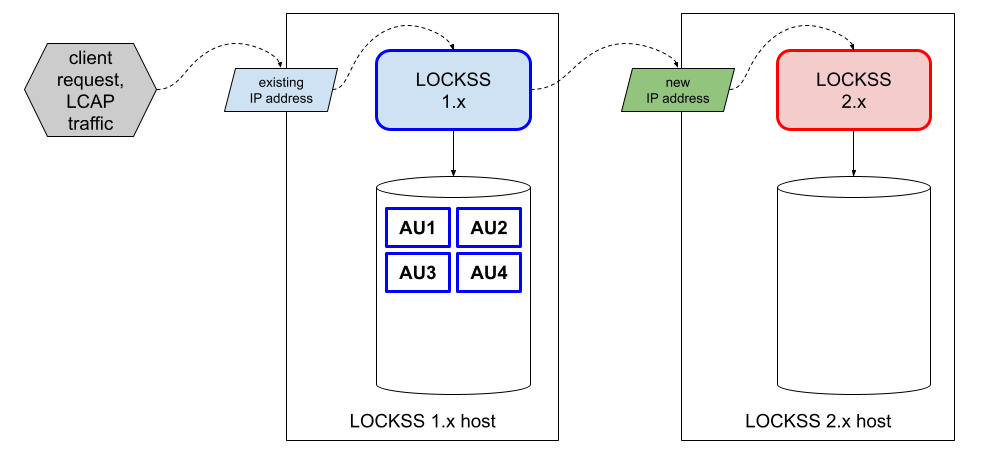
An existing LOCKSS 1.x instance is preserving content (legend [1]):
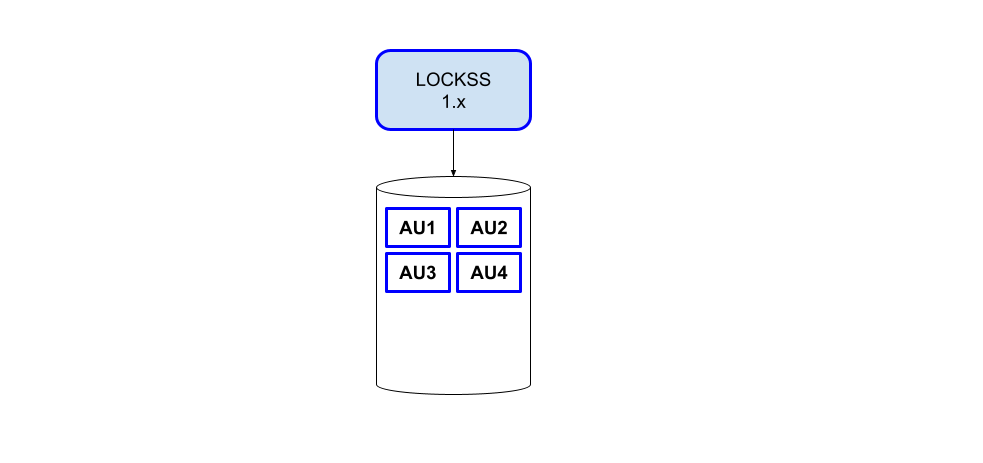
A prerequisite is to bring the LOCKSS 1.x instance up to date first, which is covered in Chapter 2 (Upgrading LOCKSS 1.x).
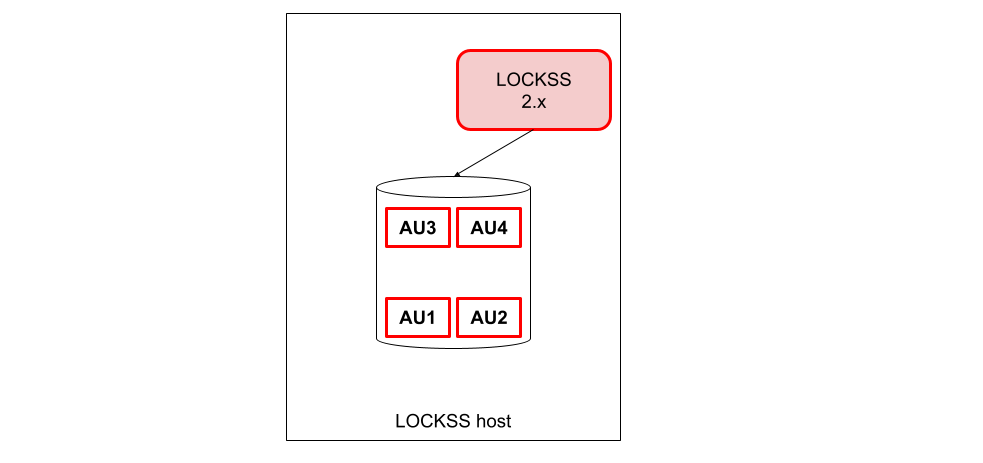
An empty LOCKSS 2.x instance is installed and configured (legend [1]):
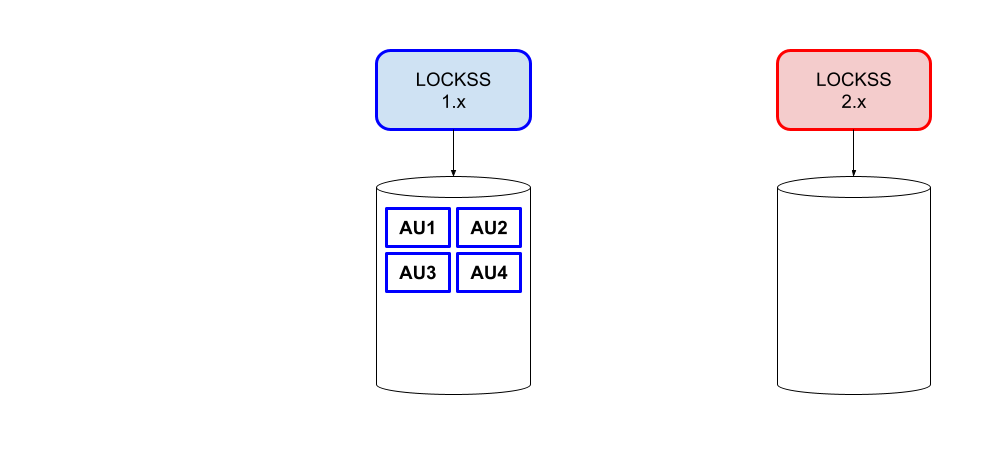
This is covered in Chapter 3 (Preparing the LOCKSS 2.x Host), Chapter 4 (Installing LOCKSS 2.x), and Chapter 5 (Configuring LOCKSS 2.x for Migration).
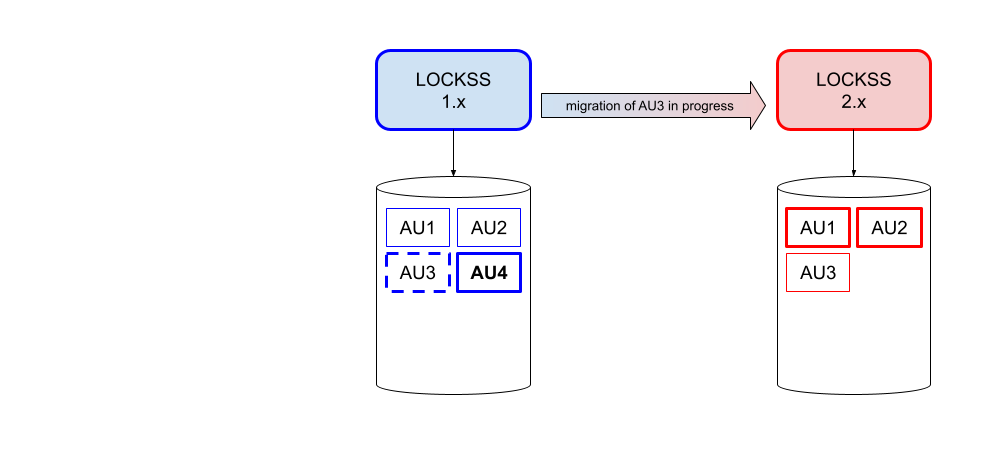
The LOCKSS Migrator sets up and executes the migration, and the LOCKSS 2.x instance is gradually populated with the data from the LOCKSS 1.x instance. This is referred to as the principal migration phase. This is covered in Chapter 6 (Configuring LOCKSS 1.x for Migration) and Chapter 7 (Running the Migrator).
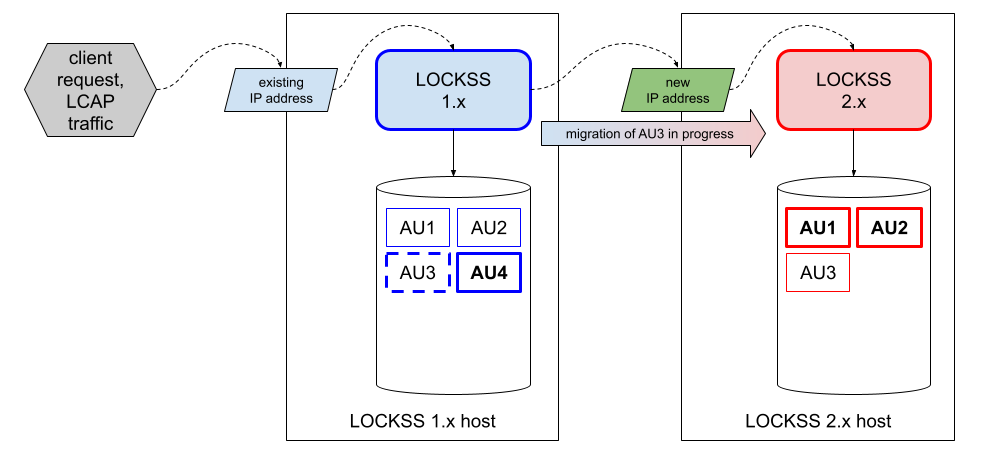
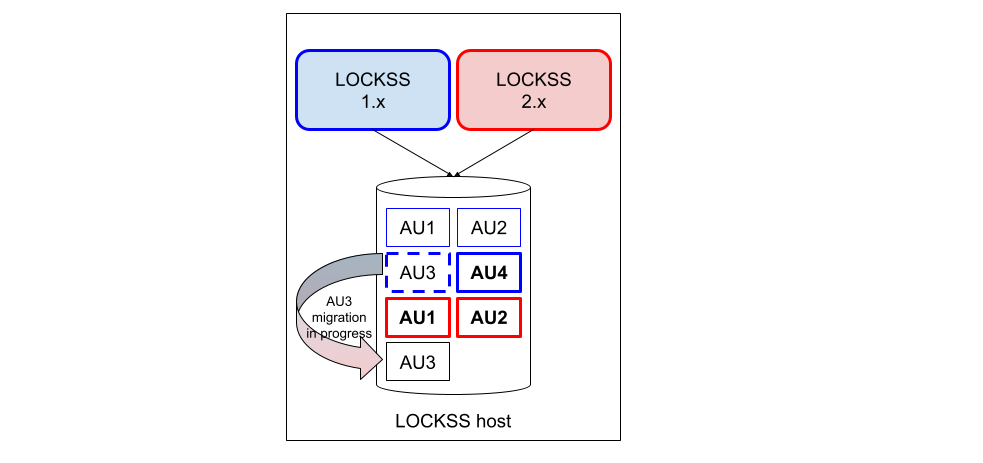
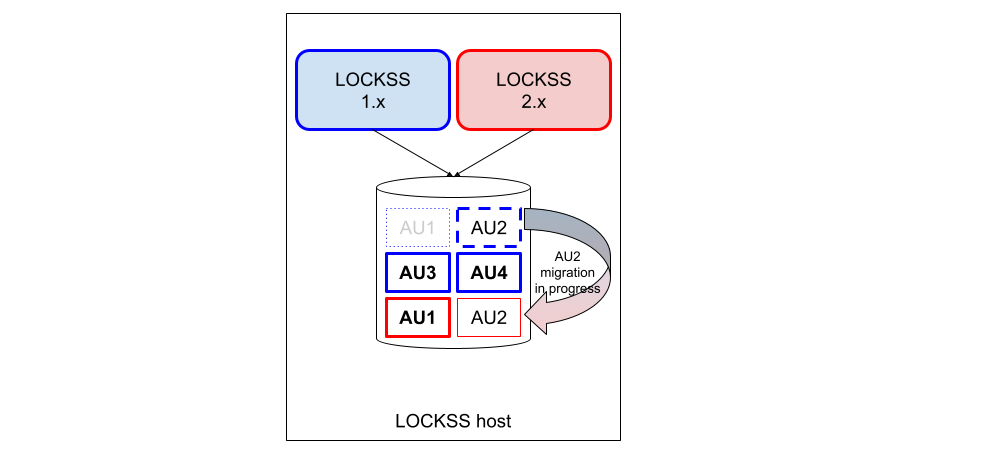
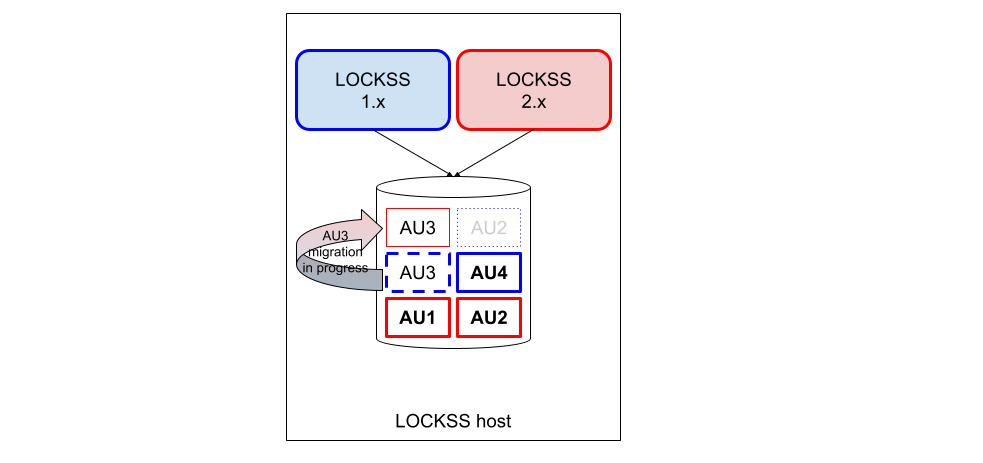
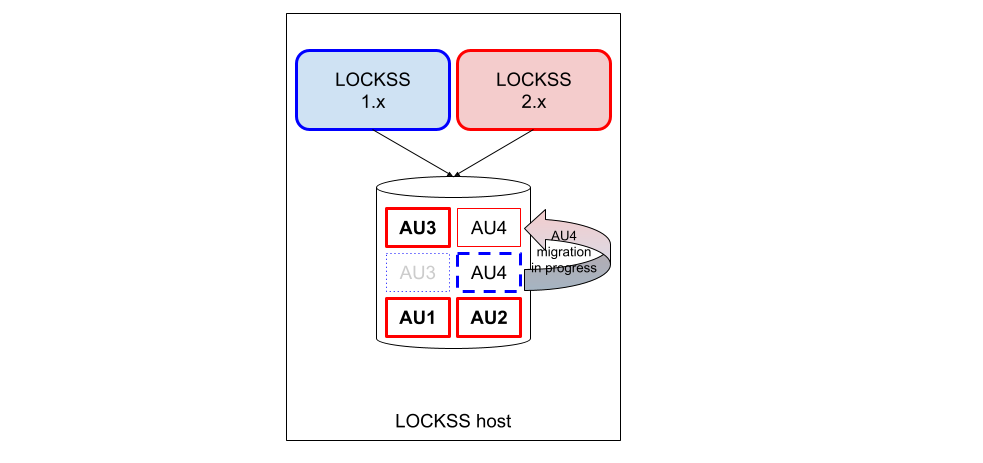
At a high level, each archival unit (AU) [2] becomes "frozen" in the LOCKSS 1.x instance; then its contents are copied to the LOCKSS 2.x instance; finally the AU is reactivated in the LOCKSS 2.x instance (legend [1]):
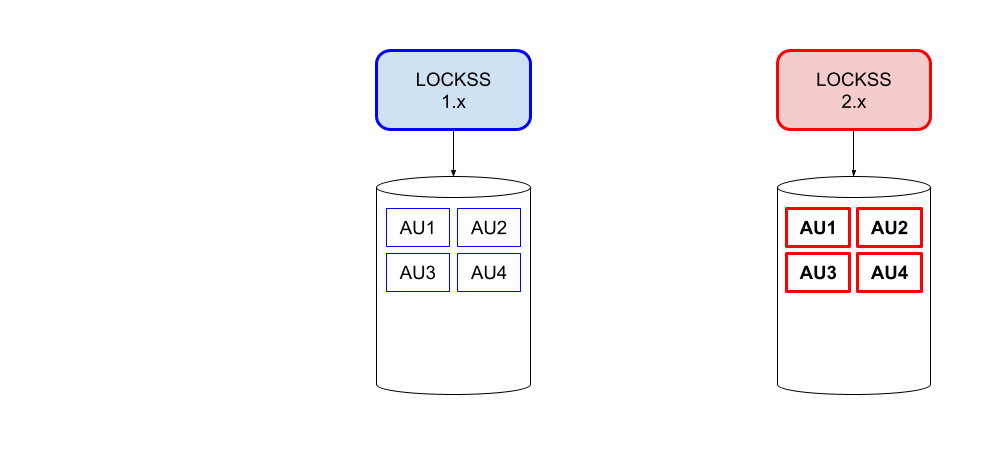
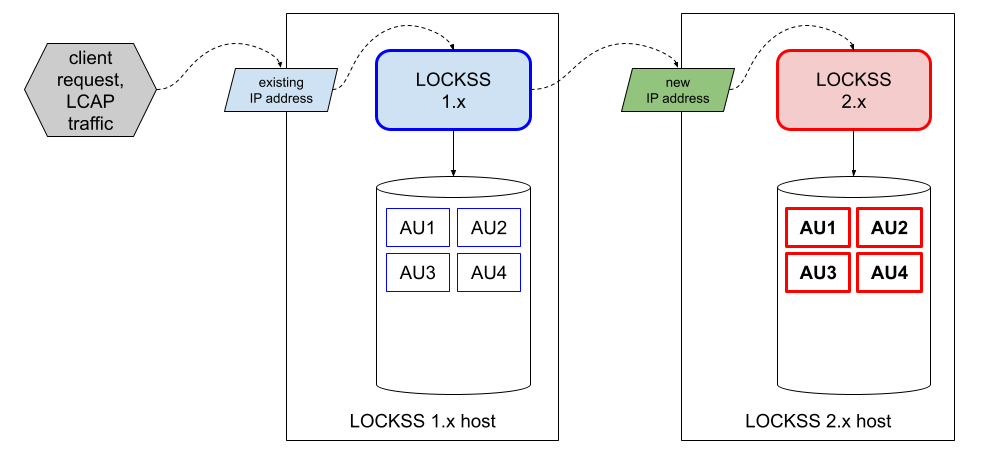
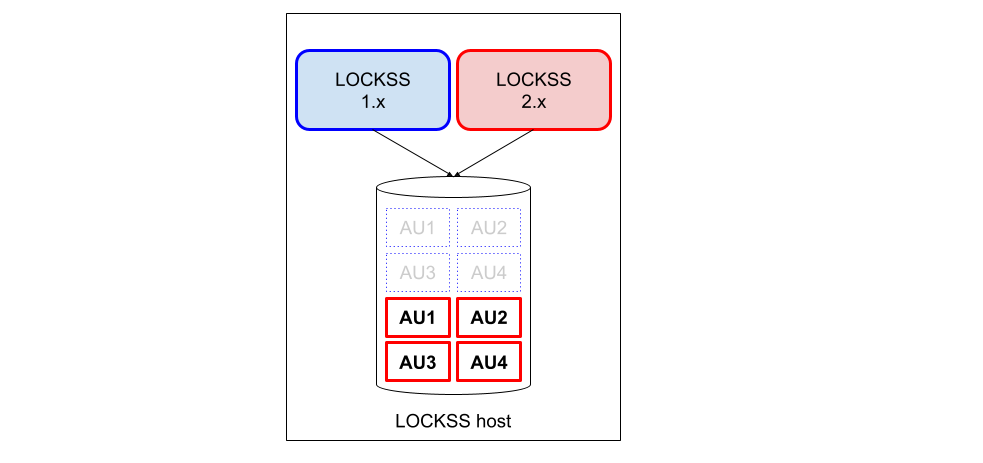
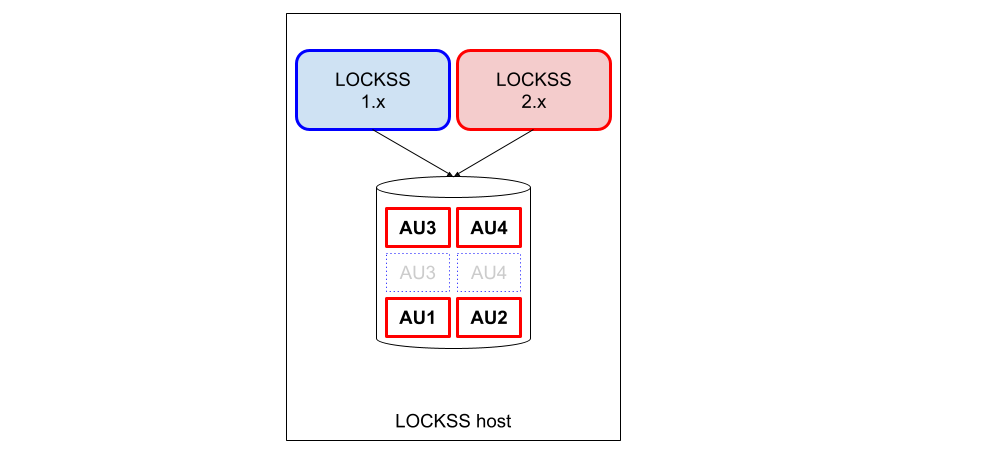
At the end of the principal migration phase, the LOCKSS 2.x instance is handling all AUs, and the LOCKSS 1.x instance is no longer handling any AUs (legend [1]):
Delegated AU handling during migration
Until it is decommissioned and the LOCKSS 2.x instance takes over, the LOCKSS 1.x instance continues to act as the recipient of most client requests and LCAP traffic for all your preserved content -- except for a number of exceptions; see Section 10.1 (Using LOCKSS During the Migration) in Chapter 10 (Appendix: Instructions for Users of LOCKSS Nodes).
Some operations, including LCAP traffic, are handled by the LOCKSS 1.x instance during migration, sometimes routing those requests to the LOCKSS 2.x instance as necessary:
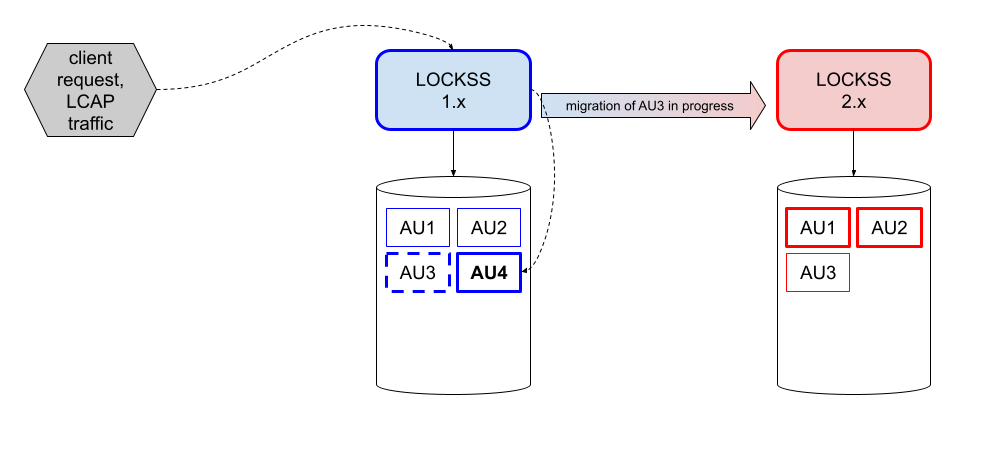
Client requests and LCAP traffic pertaining to AUs that have not been migrated yet (for example AU4 here) are handled directly by the LOCKSS 1.x instance (legend [1]):
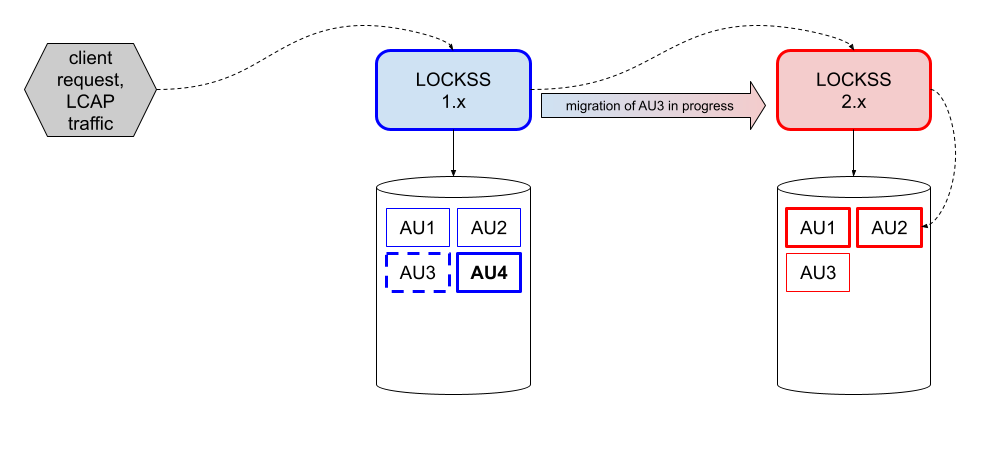
Client requests and LCAP traffic pertaining to AUs that have been successfully migrated (for example AU2 here) are received by the LOCKSS 1.x instance and forwarded to the LOCKSS 2.x instance who handles it (legend [1]):
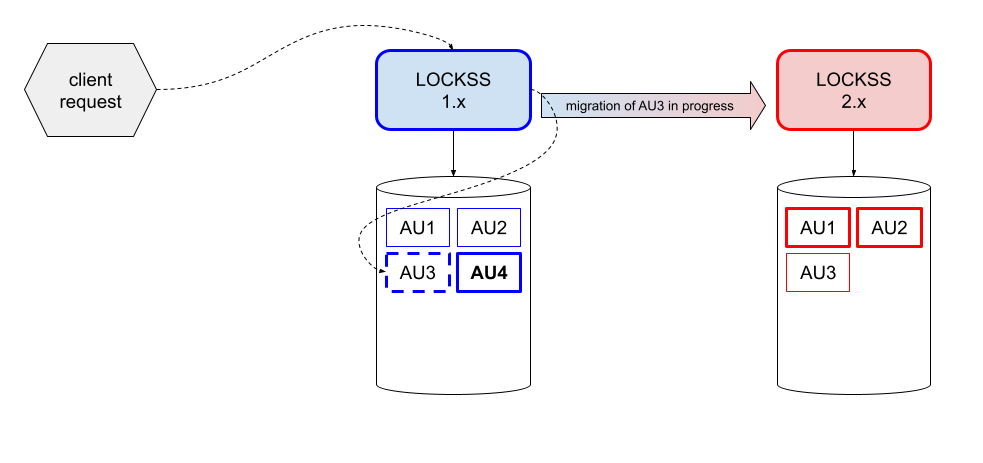
Client requests pertaining to AUs in the process of being migrated (for example AU3 here) are handled directly by the LOCKSS 1.x instance even while the AU is "frozen" (legend [1]):
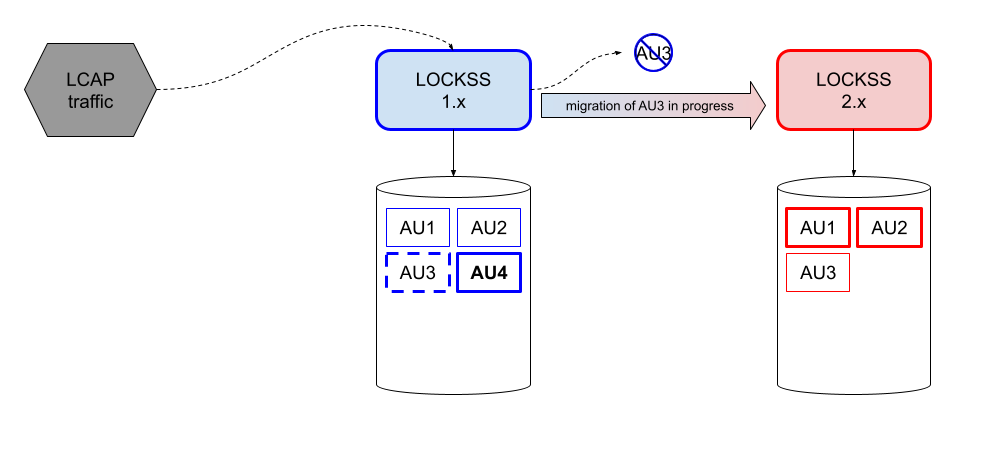
LCAP traffic pertaining to AUs in the process of being migrated (for example AU3 here) is part of some of the functions that are unavailable while the AU is "frozen", and the LOCKSS 1.x instance who receives the request does not honor it (legend [1]):
Finally, the LOCKSS 1.x instance is decommissioned (legend [1]) and the LOCKSS 2.x instance takes over:
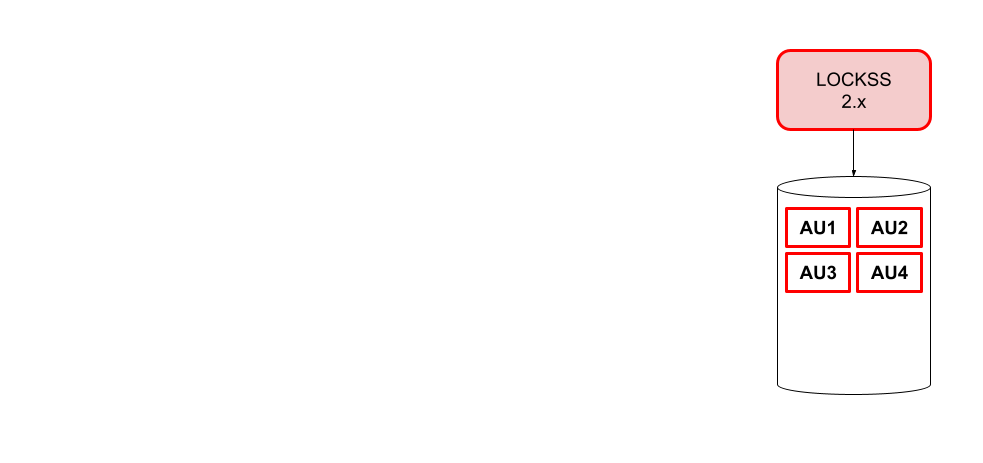
This is covered in Chapter 8 (Reconfiguring LOCKSS 2.x for Normal Operation) and Chapter 9 (Decommissioning LOCKSS 1.x).
The different Migration Scenarios differ only in two key ways: where the LOCKSS 2.x instance is located compared to the LOCKSS 1.x instance, and when the storage space occupied by deactivated AUs from the LOCKSS 1.x instance is reclaimed.
1.3. Migration Scenario
You may choose one of two migration scenarios:
New-Host Migration (recommended). In this Migration Scenario, a newly-commissioned host with its own storage is used for the LOCKSS 2.x instance. After migration, the LOCKSS 1.x instance, its storage, and its host are decommissioned.
Same-Host Migration. In this Migration Scenario, the LOCKSS 2.x instance is run on the existing host along with the LOCKSS 1.x instance. After migration, the LOCKSS 1.x instance is decommissioned. If chosen, this scenario has two subtypes: a Same-Host Migration With Future Reclamation if there is sufficient storage space to hold an entire LOCKSS 1.x and LOCKSS 2.x copy of the preserved content simultaneously (preferable), or a Same-Host Migration With Incremental Reclamation if there is not.
1.3.1. New-Host Migration
Tip
This migration scenario is recommended.
Why is a new-host migration recommended?
LOCKSS 2.x has higher system requirements.
Unlike LOCKSS 1.x, LOCKSS 2.x can be installed on a greater variety of Compatible Operating Systems. This is an opportunity to move to a new host better fitting your institution's IT infrastructure preferences.
If your LOCKSS 1.x host is running an outdated operating system in the RHEL family such as CentOS Linux 7, you must first upgrade the OS to another operating system in the RHEL family before proceeding with a same-host migration.
Running LOCKSS 1.x and LOCKSS 2.x together on the same host will degrade performance, and may cause the migration process to take longer.
In this Migration Scenario, a newly-commissioned host with its own storage is used for the LOCKSS 2.x instance. After migration, the LOCKSS 1.x instance, its storage, and its host are decommissioned.
Step by step illustration of a new-host migration
An illustration of this scenario before, during, and after the principal migration phase is shown below (legend [1]):
1.3.2. Same-Host Migration
In this Migration Scenario, the LOCKSS 2.x instance is run on the existing host along with the LOCKSS 1.x instance. After migration, the LOCKSS 1.x instance is decommissioned. If chosen, this scenario has two subtypes: a Same-Host Migration With Future Reclamation if there is sufficient storage space to hold an entire LOCKSS 1.x and LOCKSS 2.x copy of the preserved content simultaneously (preferable), or a Same-Host Migration With Incremental Reclamation if there is not.
This Migration Scenario is used when a New-Host Migration is not feasible.
If unsure about how much spare storage space is needed to choose the right Same-Host Migration or if you are close to not having quite enough spare space for two copies, contact us for adivce.
1.3.2.1. Same-Host Migration With Future Reclamation
Tip
If a Same-Host Migration is needed, this scenario is preferable to a Same-Host Migration With Incremental Reclamation.
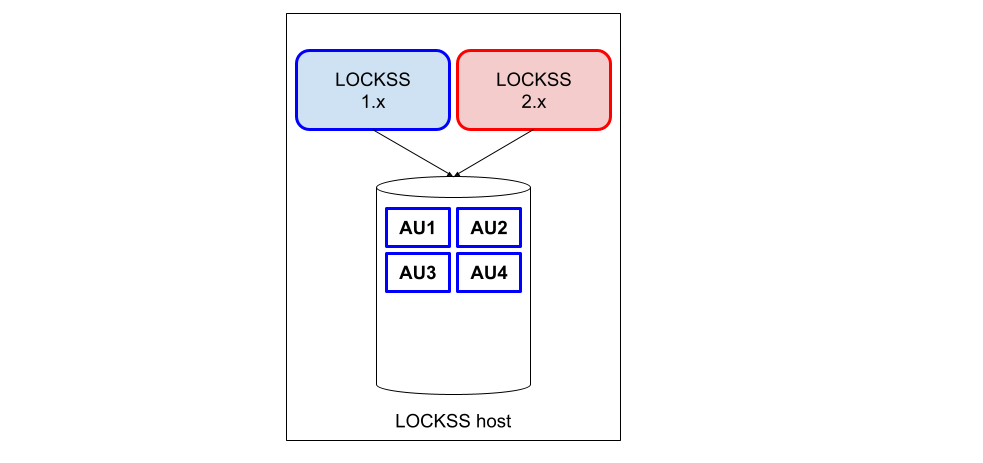
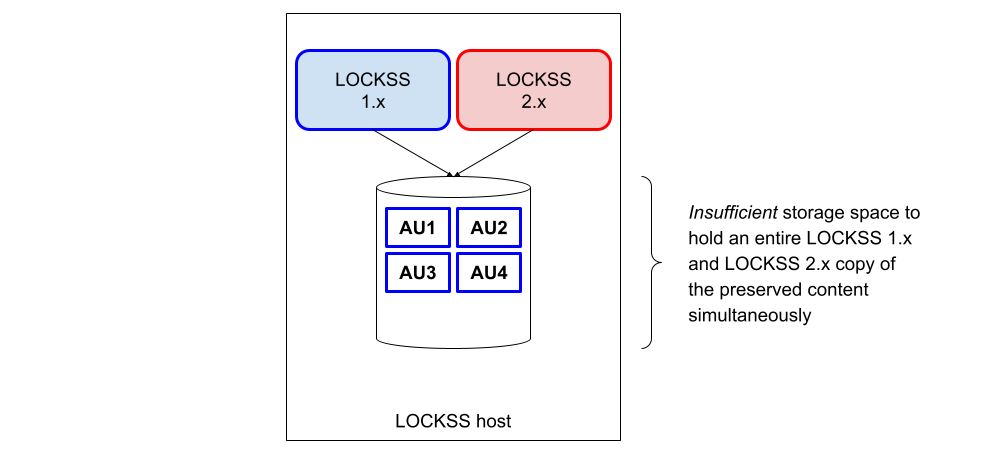
This Same-Host Migration scenario applies when there is sufficient storage space to hold an entire LOCKSS 1.x and LOCKSS 2.x copy of the preserved content simultaneously. After the entire migration is complete, the storage space formerly used by the LOCKSS 1.x instance is reclaimed.
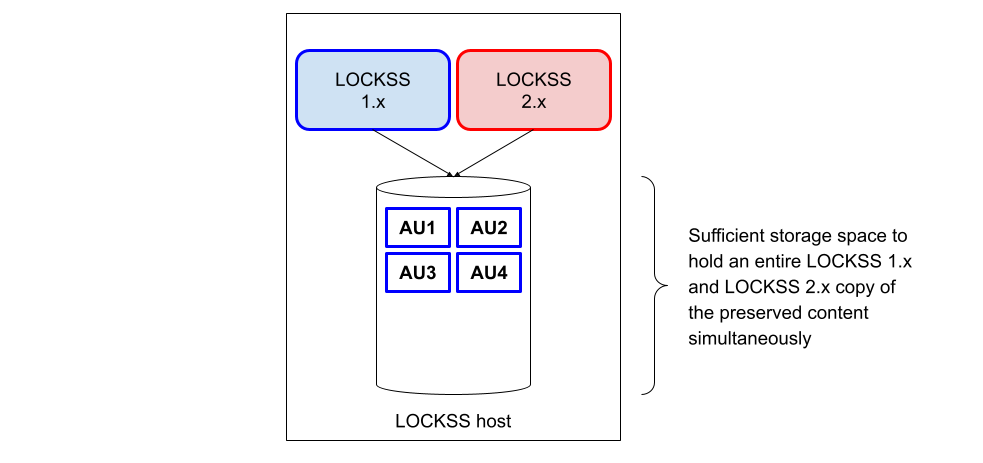
Step by step illustration of a same-host migration with future reclamation
An illustration of this scenario before, during, and after the principal migration phase is shown below (legend [1]):
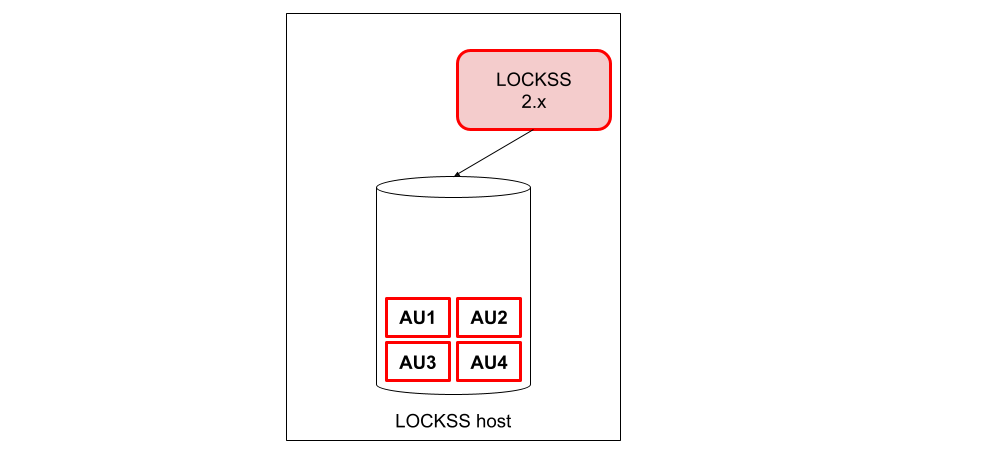
1.3.2.2. Same-Host Migration With Incremental Reclamation
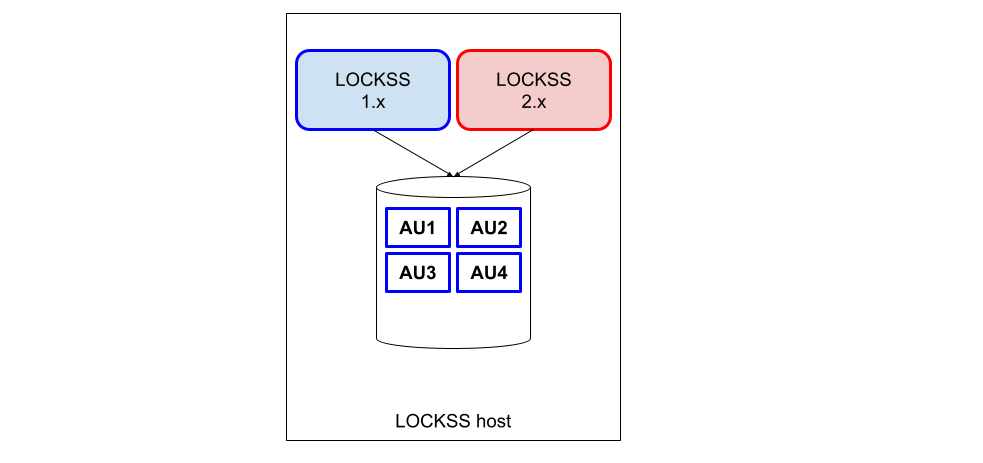
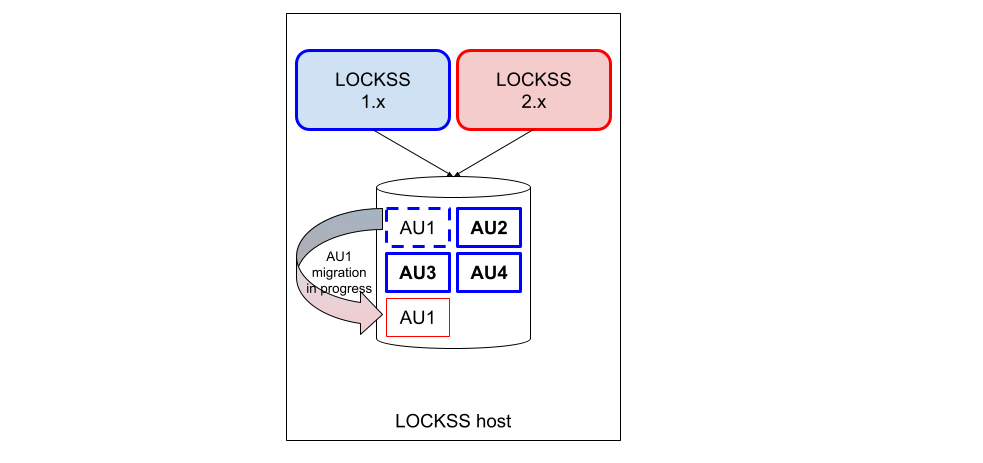
This Same-Host Migration scenario applies only when there is insufficient storage space to hold an entire LOCKSS 1.x and LOCKSS 2.x copy of the preserved content simultaneously. The LOCKSS Migrator is operated in a mode in which the storage used by each AU in the LOCKSS 1.x instance is reclaimed after the AU is done migrating to the LOCKSS 2.x instance.
Procedurally, the process is the same as that for a Same-Host Migration With Future Reclamation, except for one particular step in Section 6 (Configuring LOCKSS 1.x for Migration).
Step by step illustration of a same-host migration with incremental reclamation
An illustration of this scenario before, during, and after the principal migration phase is shown below (legend [1]):
1.4. Dry Run Migration
It is possible to try out a New-Host Migration or a Same-Host Migration With Future Reclamation in dry run mode, meaning only for testing purposes without permanent changes to your LOCKSS 1.x system. (This is not possible for a Same-Host Migration With Incremental Reclamation.)
The process is largely the same as that for a corresponding New-Host Migration or Same-Host Migration With Future Reclamation, with a few differences highlighted as such in this guide:
A step in Section 5.2 (Running configure-lockss --migrate) is slightly different for dry run migrations.
A step in Section 6 (Configuring LOCKSS 1.x for Migration) is specific to dry run migrations.
At the end of experimentation, you will need to reset your LOCKSS 2.x instance to its initial state before performing a genuine migration. See Resetting the System to a Blank State in the LOCKSS 2.x System Manual.
1.5. How To Use This Guide
1.5.1. Chapters
This guide is organized in consecutive chapters (Chapter 2 through Chapter 9) representing the steps of the migration:

followed by some appendices.
1.5.2. LOCKSS 2.x System Manual References
Many parts of this guide accompany you as you apply sections of the LOCKSS 2.x System Manual. To help identify cross-references to this complementary source of instructions, the symbol is used to denote such references, for example:
See Section 1.2.3 in the LOCKSS 2.x System Manual.
1.5.3. Parallel Sections
In a number of places, the instructions differ somewhat between a New-Host Migration and a Same-Host Migration, and you will find parallel sections for each, like in this example:
Example of instructions specific to a New-Host Migration.
Example of instructions specific to a Same-Host Migration.
1.5.4. Scenario-Specific Instruction
If a single instruction step applies only to one Migration Scenario or to a Dry Run Migration, the following visuals will augment the text to that effect:
new-host migration only This step applies only to a New-Host Migration.
same-host migration only This step applies only to a Same-Host Migration (either a Same-Host Migration With Future Reclamation or a Same-Host Migration With Incremental Reclamation).
same-host migration with future reclamation only This step applies only to a Same-Host Migration With Future Reclamation.
same-host migration with incremental reclamation only This step applies only to a Same-Host Migration With Incremental Reclamation.
dry run migration only This step applies only to a Dry Run Migration.
all other migration scenarios If a step applies to only one Migration Scenario, this counterpart applies to all other scenarios.
1.5.5. Console Hint
The commands to be typed at the console at various points in the migration process will occur in several environments, in terms of host, user, and directory, and the following visuals will augment the text to that effect:
LOCKSS 1.x host as root This command occurs on your LOCKSS 1.x host, as the
rootuser.LOCKSS 2.x host as lockss This command occurs on your LOCKSS 2.x host, as the
lockssuser, in the LOCKSS Installer Directory.LOCKSS 2.x host as root This command occurs on your LOCKSS 2.x host, as the
rootuser, in the LOCKSS Installer Directory.
LOCKSS Installer Directory
The LOCKSS Installer Directory is an important concept in LOCKSS 2.x. It is the directory from which many LOCKSS 2.x installation, configuration and operation commands are run -- usually as the lockss user, but in the case of installing LOCKSS 2.x for the first time, sometimes as the root user. The default LOCKSS Installer Directory is $HOME/lockss-installer relative to the lockss user, meaning /home/lockss/lockss-installer on most Linux systems. For complete details, see LOCKSS Installer Directory and Default LOCKSS Installer Directory in the LOCKSS 2.x System Manual.
1.5.6. Coordinating with Administrators of LOCKSS Networks
This guide is primarily aimed at operators of individual LOCKSS nodes, but some actions must be performed by administrators of LOCKSS networks through the transitional period of migration of the nodes from LOCKSS 1.x to 2.x (before any node migrates, before and after each node migrates, and after all nodes migrate). Information for administrators of LOCKSS networks can be found in Chapter 11 (Appendix: Instructions for Administrators of LOCKSS Networks), but throughout this guide, hints to coordinate with them are highlighted in the appropriate places like this:
Coordinating with Administrators of LOCKSS Networks
Example of a hint to coordinate with the administrator of your LOCKSS network. See Chapter 11 (Appendix: Instructions for Administrators of LOCKSS Networks).
1.5.7. Containerized LOCKSS 1.x
A few additional instructions apply only in the unlikely event you are running LOCKSS 1.x as a Docker container. These additional instructions are marked with this special visual:
containerized LOCKSS 1.x This step applies only if you are running LOCKSS 1.x as a Docker container.
1.6. Important Considerations
1.6.1. Adopting the LOCKSS 1.x IP Address
The LCAP identity of a LOCKSS node in a LOCKSS network is predicated in part on the node's IP address. A New-Host Migration automatically involves a new IP address for the LOCKSS 2.x host during the migration, which you might be tempted to keep long term.
Near the end of the migration, in the designated New-Host Migration step in Chapter 8 (Reconfiguring LOCKSS 2.x for Normal Operation), it is strongly recommended that you allow your LOCKSS 2.x host to adopt the IP address previously associated with your LOCKSS 1.x host.
Note
If adopting the IP address of your LOCKSS 1.x host is not possible, there are implications for the administrator of your LOCKSS network and the other nodes in your network. See Change of LCAP identity in Chapter 11 (Appendix: Instructions for Administrators of LOCKSS Networks).
1.6.2. Adopting the LOCKSS 1.x LCAP Port
Likewise, the LCAP identity of a LOCKSS node in a LOCKSS network is predicated in part on the node's LCAP (LOCKSS audit and repair protocol) port. A Same-Host Migration automatically involves a secondary LCAP port for the LOCKSS 2.x during the migration which you might be tempted to keep long term. Additionally, all migrations involve Configuring LOCKSS 2.x for Migration and Reconfiguring LOCKSS 2.x for Normal Operation, where you might be tempted to choose a different primary LCAP port than your LOCKSS 1.x instance.
Near the end of the migration, in the designated step in Chapter 8 (Reconfiguring LOCKSS 2.x for Normal Operation), it is strongly recommended that you allow your LOCKSS 2.x host to adopt the LCAP port previously associated with your LOCKSS 1.x host.
Note
If adopting the LCAP port of your LOCKSS 1.x host is not possible, there are implications for the administrator of your LOCKSS network. See Change of LCAP identity in Chapter 11 (Appendix: Instructions for Administrators of LOCKSS Networks). Additionally, there are implications for your firewall infrastructure.
1.6.3. Adopting the LOCKSS 1.x Hostname
Similarly to the IP address, a New-Host Migration automatically involves a new hostname for the LOCKSS 2.x host during the migration, which you might be tempted to keep long term. Adopting the hostname of your LOCKSS 1.x host at the end of the migration is not strictly required for the LOCKSS 2.x to function, but it is recommended.
Note
If adopting the hostname of your LOCKSS 1.x host is not possible, there are implications for accessing the Web user interface, and browser bookmarks, monitoring tools and dashboards, link resolvers (e.g. OpenURL resolvers), proxy configuration, etc. will need to be updated.
1.6.4. LCAP Over SSL
If your LOCKSS network uses SSL keystores for encrypted LCAP communication between nodes, you will need to perform a few additional steps related to your LCAP SSL keystore during the migration of your node. Ask your LOCKSS network administrator if this situation applies to you, and if so, contact us for further advice.
Footnotes